

Designing a Unified API Layer for HL7 FHIR Data Exchange
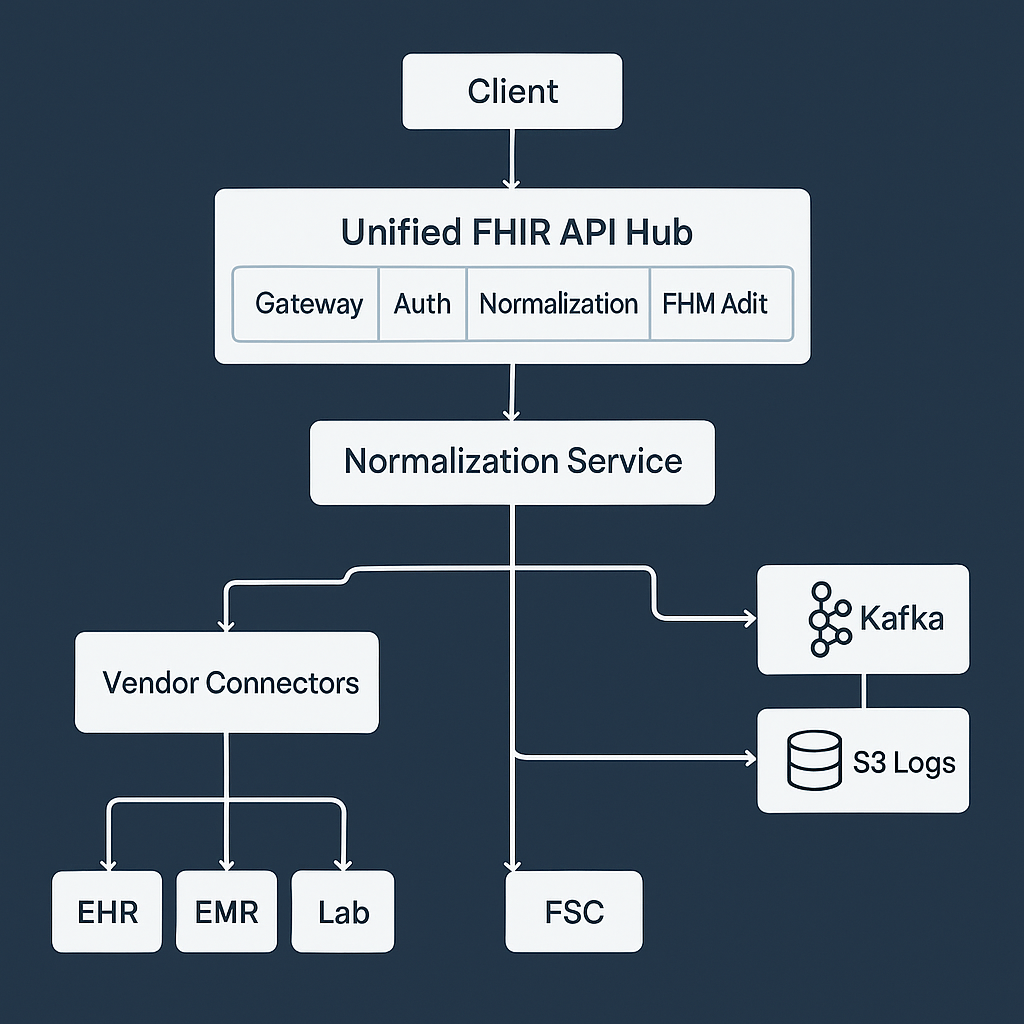
Healthcare systems generate large volumes of data spread across different platforms — electronic health records, insurance systems, lab software, and more. Each one structures information in its own way, often making interoperability difficult.
The HL7 FHIR (Fast Healthcare Interoperability Resources) standard was created to improve how healthcare data is exchanged. It defines resource structures such as Patient, Observation, and Encounter, and provides a consistent API approach.
However, even when data is already formatted as FHIR, different vendors implement it differently. A unified API layer brings these sources together under a single, reliable, and secure interface. It provides one endpoint for client applications, while handling authentication, normalization, and validation internally.
For background on normalization and its role in API consistency, see How Data Normalization Keeps Your Unified API Consistent Across Platforms.
1. Why a Unified API Layer for FHIR
A unified API simplifies healthcare integrations by managing all vendor differences behind one interface. It routes requests, handles authentication, converts data formats, and enforces consistency.
+------------------------------------------+
|            Unified API Layer             |
+------------------------------------------+
| Normalization | Auth | Routing | Mapping |
+------------------------------------------+
|  FHIR Mapper  | Vendor Connectors        |
+------------------------------------------+
|  EHR | EMR | Lab | Insurance Systems     |
+------------------------------------------+
Applications call the unified endpoint, and the system manages vendor-specific logic invisibly.
2. Why Normalization Is Still Needed with FHIR
At first, it may seem that normalization is unnecessary when all systems already use the FHIR standard. In practice, normalization is still critical for several reasons.
a. FHIR is a Standard, Not a Single Implementation
Each vendor interprets FHIR slightly differently. Field names, nesting, and extensions often vary.
Example:
Epic:
{ "resourceType": "Patient", "id": "123", "name": [{ "given": ["John"], "family": "Doe" }] }
Cerner:
{ "resourceType": "Patient", "id": "123", "name": [{ "text": "John Doe" }], "extension": [{ "url": "custom/ethnicity", "valueString": "Caucasian" }] }
Both are valid FHIR Patient resources, but the structure differs. The normalization layer converts these vendor-specific representations into a single canonical schema so every response looks identical.
b. FHIR Versions Vary
Some vendors use older versions such as DSTU2 or STU3, while others are on R4 or R5. Field definitions and nesting differ between versions.
The unified API normalizes all inputs to one common version so client systems do not need to handle version-specific logic.
c. Custom Extensions
FHIR allows custom extensions for vendor-specific fields. One EHR might include extra demographic data or internal identifiers. The normalization layer can remove, rename, or map these extensions to standard fields.
d. Merging Multiple Sources
When aggregating data from several systems, normalization is required to merge and reconcile overlapping records, handle duplicates, and unify identifiers.
e. Business Logic and Validation
FHIR defines structure, not business rules. Normalization applies data cleaning, validation, and cross-system logic such as required status codes or standardized enumerations.
f. Performance and Caching
Normalized data can be flattened or preprocessed for caching and fast analytics without breaking FHIR compliance.
g. FHIR-to-FHIR Normalization Example
Even when both input and output are FHIR, you may still standardize field formats:
def normalize_fhir_patient(resource):
    name = resource.get("name", [{}])[0]
    if "text" in name:
        full_name = name["text"]
    else:
        full_name = f"{' '.join(name.get('given', []))} {name.get('family', '')}".strip()

    return {
        "resourceType": "Patient",
        "id": resource["id"],
        "name": [{"text": full_name}],
        "gender": resource.get("gender", "unknown"),
        "birthDate": resource.get("birthDate")
    }
Normalization keeps the unified API predictable even when vendors follow different interpretations of the same FHIR model.
3. Microservices Architecture
Each part of the unified API runs as an independent microservice.
+------------------------------------------------------+
|              Unified FHIR API Hub                    |
+------------------------------------------------------+
| Gateway | Auth | Normalization | FHIR Mapper | Audit |
+------------------------------------------------------+
| Vendor Connectors | Queue (SQS) | Kafka | S3 Logs     |
+------------------------------------------------------+
Services include:
- API Gateway: Receives and routes client requests.
- Auth Service: Manages tokens and vendor credentials.
- Normalization Service: Converts and validates FHIR resources.
- FHIR Mapper: Applies schema rules and validation.
- Connector Services: Communicate with external EHR or EMR APIs.
- Audit Service: Logs all requests to S3 for compliance.
4. Data Flow
Client
  |
  v
[API Gateway]
  |
  v
[Auth Service]
  |
  v
[Connector Service] -> Pull FHIR or HL7 Data
  |
  v
[Normalization Service] -> Convert to Canonical FHIR
  |
  v
[FHIR Mapper] -> Validate and Return Response
Clients receive normalized FHIR resources without worrying about vendor details.
5. Python Example for Normalization
from pydantic import BaseModel
from typing import List

class FHIRName(BaseModel):
    text: str

class FHIRPatient(BaseModel):
    resourceType: str = "Patient"
    id: str
    name: List[FHIRName]
    birthDate: str
    gender: str

def normalize_to_fhir(raw):
    return FHIRPatient(
        id=raw.get("id"),
        name=[FHIRName(text=raw.get("patient_name"))],
        birthDate=raw.get("dob"),
        gender=raw.get("gender")
    ).dict()
This ensures that even non-standard patient data from a vendor becomes a clean FHIR Patient resource.
6. Event-Driven and Async Processing
Healthcare systems often require asynchronous operations. The unified API can use SQS for queue-based jobs and Kafka for real-time data streaming.
Request --> API Hub --> Kafka Topic --> Worker --> Normalization --> FHIR Response
- SQS handles retries and decoupled processing for large data syncs.
- Kafka streams real-time events such as patient updates or lab results.
This makes the architecture both scalable and responsive.
7. Security and Reliability
Security
- Enforce TLS and role-based access control.
- Rotate API keys and tokens automatically.
- Store credentials in Vault or AWS Secrets Manager.
Reliability
- Use Redis for caching.
- Apply retry queues and circuit breakers for vendor failures.
- Log every transaction to S3 for audit and traceability.
8. Observability and Monitoring
Every request is traced through logs, metrics, and alerts.
+-------------------------------------------+
| Observability Layer                       |
+-------------------------------------------+
| Metrics | Logs | Traces | Alerts | Dashboards |
+-------------------------------------------+
Use Prometheus and Grafana for metrics, ELK for logs, and OpenTelemetry for distributed tracing.
Attach correlation IDs to requests to trace them through Kafka, queues, and connectors.
9. Audit Logging with S3
All API calls and data transformations should be logged for compliance.
Example audit record:
{
  "event_id": "a1b2c3",
  "timestamp": "2025-11-10T18:22:00Z",
  "user": "api_client_12",
  "action": "READ_PATIENT",
  "vendor": "Epic",
  "status": "success"
}
Logs are stored in Amazon S3 for durability and can be queried later using Athena or Elasticsearch.
10. Summary
Even when vendors provide FHIR APIs, a normalization layer is still essential because:
- Each vendor implements FHIR differently.
- Versions and extensions vary.
- Data must be merged and validated across systems.
- Business logic and auditing need a central point.
A unified API built on microservices handles all these tasks securely and reliably.
With asynchronous queues, Kafka for real-time exchange, and S3 for audits, the architecture scales to support growing data volumes and regulatory needs.
For more on how normalization strengthens unified API design, read How Data Normalization Keeps Your Unified API Consistent Across Platforms.
